
Notify me monthly
about news and fun
stuff

Keep up on the
latest at Facebook

Tracy Tappan
Romance Author on

Follow Tracy on

Follow Tracy on

Follow Tracy on
GoodReads

Follow Tracy on
BookBub!

Coming April 16th,
2018

Pre-order: Amazon |

Available now!

FREE to Kindle Unlimited subscribers!
Available Now!

FREE to Kindle Unlimited subscribers!
Make This Months Session Of The Character Couch
Magically Appear On My Kindle!
Enter your "KINDLE" email address below and it will magically appear on your Kindle!
Please ensure you enter you "KINDLE" email address and not your personal email. If you're not sure how to find your Kindle email, see directions below!
If you don't know your free Kindle email address or need help setting it up
1. Sign onto your Amazon.com account
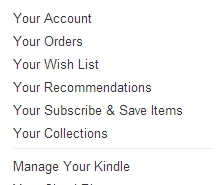
2. Click on "Your Account" in the upper right hand corner and then "Manage Your Kindle."

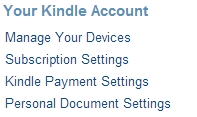
3. Click on "Personal Document Settings" under Your Kindle Account on the left hand side.
4. Find the email address next to your eReader under "Send-to-Kindle E-Mail Settings."

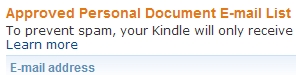
5. Ensure the email address you will be sending the MOBI file from is on the approved email list. If not, add it.
6. Download the Character Couch Session by clicking the download link next to .Mobi (Kindle)

7. Email this file from your approved email address to your free Kindle email address and it will show up in your library.
Transfer by connecting your Kindle to your computer:
1. Download the MOBI format file to your computer.
2. Using the USB/charging cable provided with the Kindle, connect your Kindle to the computer.
3. Drag and drop the file to your Kindle's "documents" folder, using your computer's file browser.
4. When done, eject the Kindle’s disk icon (right-click on the icon and choose “Eject.”).
Viewing .PDF files on your computer
PDF files are best viewed on your computer, and are also good for printing. Simply download the .PDF file, click to open and read or print. If you do not have adobe reader, you can download it here.